Page History
...
Hypertext is, simply put, digital text that contains hyperlinks to other text which the reader uses to readily navigate when accessing information. The FA Wiki uses hypertext throughout the website to cross-reference FA-related information via hyperlinks and interactive multimedia (sometimes referred to as 'hypermedia"). When you see text like this, it means there is a link to another wiki page or outside reference with further information.

Tooltips
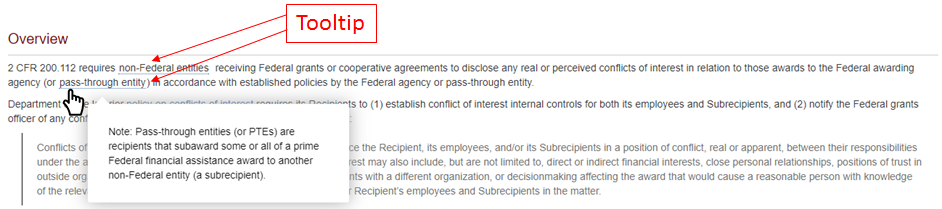
Tooltips are information elements used in conjunction with a mouse pointer to display additional information for the reader. The tooltip is activated by hovering the mouse pointer over the item (word or phrase, marked with a dotted blue underline) without clicking. This will display a "hover box" containing the additional information.
Search Box
The Search box is a key navigation tool of the FA Wiki. Located in the upper right hand corner of every page, the Search box applies a number of parameters to produce better refined search results than a simple word search would.
To use Search, simply begin typing out the word or phrase you are looking for. You will immediately begin to see search returns below the Search box, with those returns becoming more specific as you type.
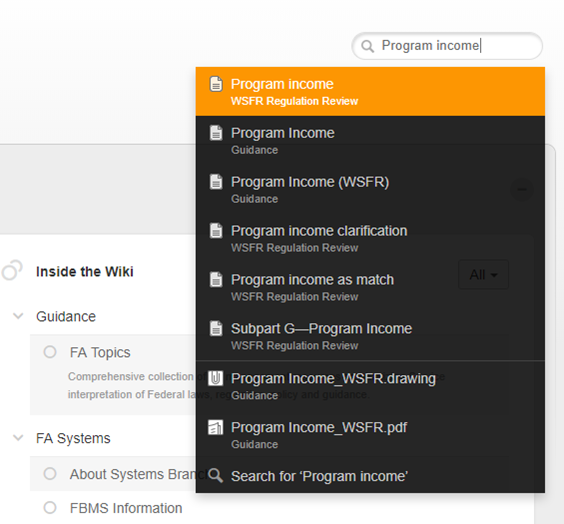
You can either select one of the Search returns shown, or select the "Search for 'xx'" option at the bottom.

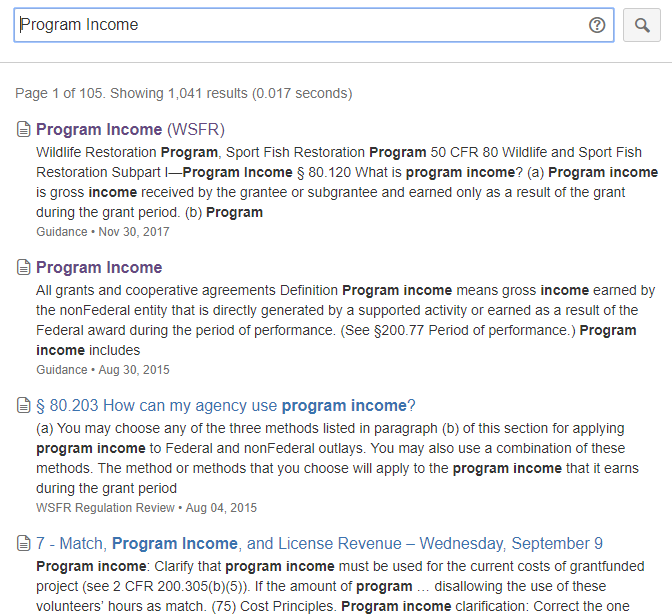
This will display the complete Search results for your desired word or phrase. Included will be the number of Search results.
Page Theme
For the majority of FA topic pages, the format is standardized and features a Content box, an Info box identifying where the topic applies (which FA award types, FWS FA programs, etc), and the following topic sections:
...

